Five tools' worth of work, one place to look
Small teams don't have an ops person to glue tools together. Oplero is modular: switch on tasks and calendar today, add invoicing or the helpdesk when you need them. Everyone works from the same data, and nobody asks which app the answer lives in.
Create free workspace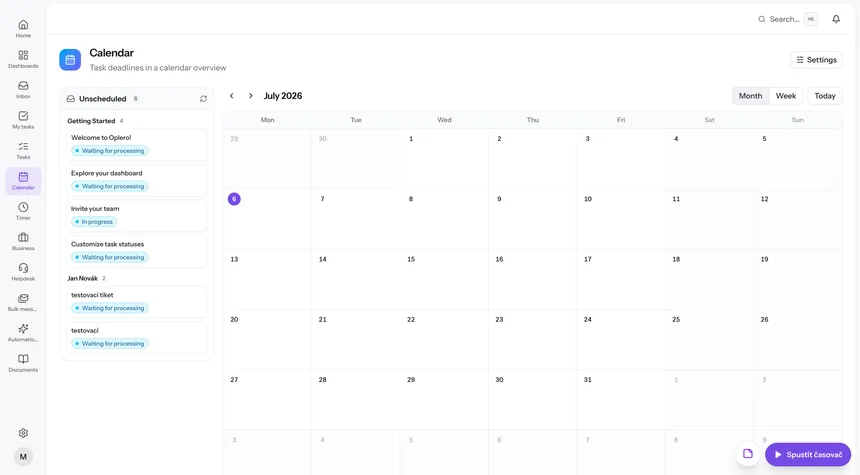
Sound familiar?
Every tool has its own truth
The deadline in the project tool doesn't match the one in the calendar, and the hours in the tracker don't match the invoice. Someone reconciles it all by hand.
Onboarding means five logins
A new teammate needs accounts, permissions and a tour in each tool before they can do anything useful. Week one is spent on setup.
Paying for features nobody uses
Big platforms bundle everything and charge for it, while your team uses a tenth of the buttons and still needs another app on the side.
How it works day to day
- 1
Start with the core
Tasks, calendar, timer and documents are on from day one. Import your existing data from CSV or Excel with a preview.
- 2
Shape it to your team
Define your own task statuses, custom fields and saved filters. Roles with granular permissions decide who sees what.
- 3
Switch on modules as you grow
Need invoicing? One toggle in Settings → Modules. Helpdesk, quotes, campaigns — each appears for the whole team the moment you need it.
- 4
Work from one page
Real-time sync, a shared calendar with drag-and-drop planning and one inbox of notifications keep everyone looking at the same picture.