Track every billable minute without thinking about it
A floating start-timer button follows you through the whole app, so tracking begins where the work begins. Review your hours as a list, a timesheet grid or a calendar, and see today, this week and billable totals at all times.
Replaces Toggl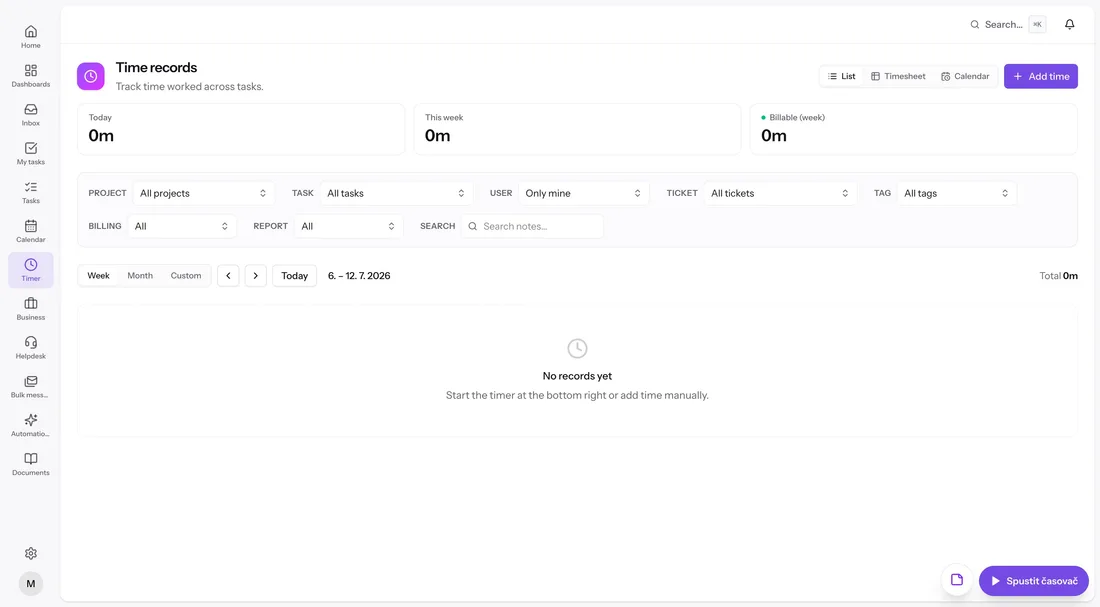
A timer that's always within reach
Start, stop or switch the live timer from the floating button on any screen — you don't have to find the task first. Forgot to track? Add time manually after the fact. Either way the entry lands on the right task and project.
- Live timer: start, stop, switch
- Floating timer button available app-wide
- Manual time entries for the hours you forgot
Three views, sharp filters
Look at time as a plain list, a timesheet grid or a calendar. Filter by project, task, user, ticket, tag or billing status, and switch ranges between week, month and custom. Time tags let you categorize work your own way.
- List, timesheet and calendar views
- Filters: project, task, user, ticket, tag, billing status
- Time tags for categorizing work
Built to be billed
Summaries show today, this week and billable hours for the week, so you always know where you stand before the invoice. When it's time to bill, tracked hours aggregate straight into a timesheet report in the invoicing module.
Everything included
- Live timer with start, stop and switch
- Floating timer button on every screen
- Manual time entries
- List, timesheet grid and calendar views
- Filters by project, task, user, ticket, tag and billing status
- Time tags
- Today, this week and billable-week summaries
- Week, month and custom date ranges
- Feeds directly into timesheet reports and invoices